
In Jadu, the person who built a page is the 'owner' of that page by default. You can 'view all pages' and see all the pages you are authorized to edit, but they may not be under your ownership. If you maintain certain pages, you can switch ownership so the pages show up under your page listings.
If someone in your department has ownership of a page, you may want to discuss who should maintain that page with your supervisor before you take ownership.
In addition, you can take ownership if a page is owned by any of these names:
Ramona Fritschi
Kris Hardy
or is orphaned
Here's how to change the ownership:
1 - Go to either Open > Publishing > Document Pages or Open > Publishing > Homepages and click View: All Homepages / Document Pages
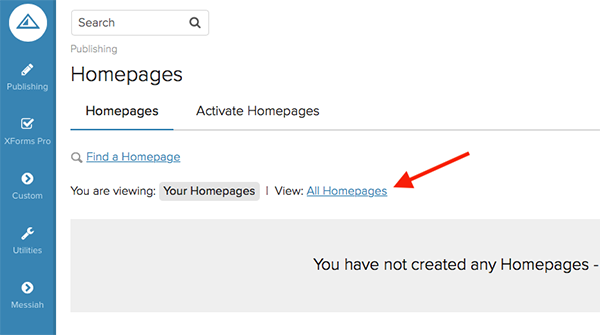
2 - Find the page you want to own or assign someone else, check the box next to the current owner's name and click "Change"

3 - Click the drop-down and select the appropriate name from the list. Click "Apply Changes"
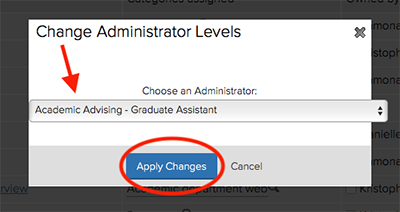
When you click "Apply", the page will be under the new ownership and will appear in the list of pages under "Your Homepages" if you are the new owner.
Comments
0 comments
Please sign in to leave a comment.